- Identity
- Read-only
Google Workspace and Qastel
See which AI apps have been let into your Google Workspace: who granted them access, and to what.
Why “Sign in with Google” is where AI arrives
When someone first signs in to an AI tool with their Google account, or lets it reach their mail or files, Google writes it down. Qastel reads that record alongside your directory and turns it into a governed inventory of AI apps, each with the people who gave it access.
For a Google organisation, the front door to most AI tools is a button. Someone clicks “Sign in with Google”, approves a consent screen, and a new AI app now holds a token to their account, sometimes to their mail, their Drive or their calendar. Nobody bought it. Nobody reviewed it.
Reading the record Google already keeps
Google keeps every one of those grants for six months. Qastel reads the full history on the first sync, recognises the AI apps among them and names the vendor and product behind each, so a tool one person authorised in the spring and one forty people have handed their account to stop looking alike.
The directory does the rest. People, aliases, and suspended or departed accounts come from Google, so every AI app is tied to someone in your organisation rather than to an address nobody recognises.
What you get
Discover, assess, control, comply.
What Google Workspace gives Qastel, at each of the four stages.
Discover
Every AI app people have signed in to or granted access with their Google account, recognised by vendor and product, including the ones authorised months ago.
Assess
Each one rated for risk and data sensitivity, with the scopes it was granted: a sign-in is not the same as a key to someone's inbox.
Control
See who gave each AI app access, so a review starts with names rather than an anonymous client ID.
Comply
A dated record of which AI vendors hold access to your Google organisation, refreshed every four hours.



One delegation entry, read-only
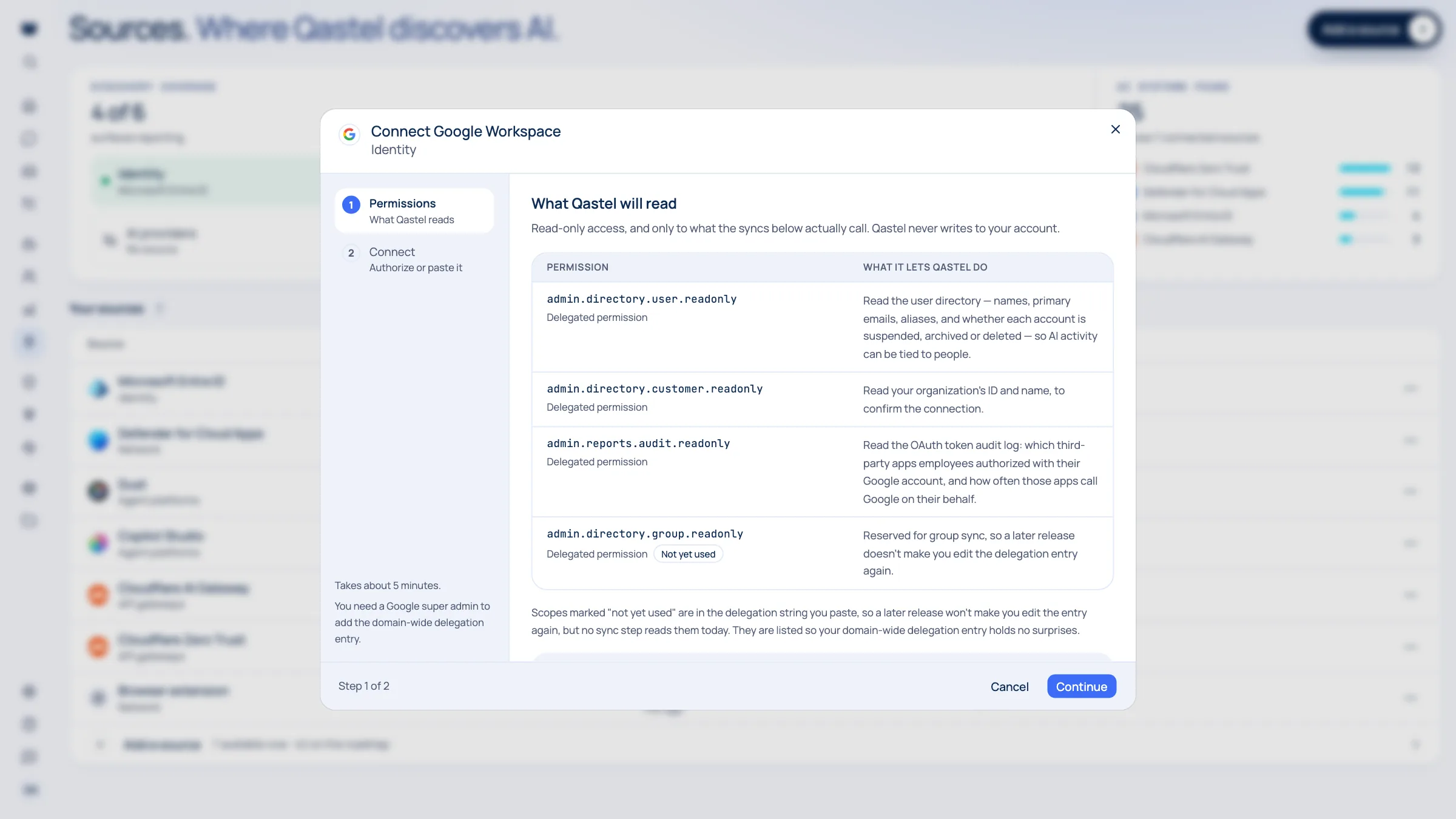
Qastel connects through a single delegation entry in the Google Admin console, with read-only scopes. It does not read mail, Drive files, calendars or Chat messages, and it cannot change anything in your organisation.

What Qastel reads
From Google Workspace
- Every account in your directory
- The apps people authorised with Google
- The scopes each app was granted
Read-only. Nothing is written back.
Connect Google Workspace
Connects through one domain-wide delegation entry in the Google Admin console. Read-only scopes, no password or key of yours stored, and nothing in your organisation is ever changed.
What you need before you start
- A Google Workspace organisation
- A super admin, to add the delegation entry and to be the account Qastel reads as
In Qastel, open Sources, choose Google Workspace, and copy the client ID and the read-only scopes it shows.
In the Google Admin console, add them under Security → API controls → Manage domain-wide delegation, and authorise.
Back in Qastel, enter the super admin's email and connect. Google usually applies the entry within minutes.
See what Google Workspace already knows about your AI.
Read-only, in minutes. Nothing is ever written back.