- AI providers
- Read-only
Claude and Qastel
Your Claude Enterprise organisation, governed: its settings, its seats, its daily use, and every Project inside it.
Why the settings are the risk
Claude Enterprise is shaped by a handful of admin settings (SSO, retention, the training opt-out, which capabilities are switched on) and those settings decide most of its risk. Qastel reads them from Anthropic's Compliance API with the seat roster, daily activity and every Project, and reassesses Claude when a setting changes.
The same Claude licence can be a tightly governed workspace or an open one. Retention, SSO, the training opt-out, Claude Code, web search, public projects: a few switches in an admin panel decide how far data can travel, and anyone with the role can flip them.
Every setting, and every change to it
Qastel records each organisation's settings and which Claude capabilities are on. Admin security changes (SSO turned off, an IP restriction deleted, an API key created) are kept as evidence, and Claude is reassessed automatically when the settings move.
What you get
Discover, assess, control, comply.
What Claude gives Qastel, at each of the four stages.
Discover
Every Claude Project, surfaced as an AI system with its owner, instructions and sharing.
Assess
Claude rated on its actual settings (retention, SSO, training opt-out, enabled capabilities) and reassessed when they change.
Control
Seats set against daily use, and admin security changes kept where the next review will see them.
Comply
Evidence of how the organisation is configured, and of every security-relevant change to it, without storing a conversation.




Projects, seats and use
Each Project appears beneath Claude as an AI system of its own, with its instructions, its owner and whether it is shared, and is assessed on its own. Seat holders are linked to your people, and their daily activity shows who relies on Claude. Qastel never reads conversations or the contents of attachments.

What Qastel reads
From Claude
- Workspace settings and enabled features
- Seats and daily activity, per person
- Projects and admin security changes
Read-only. Nothing is written back.
Connect Claude
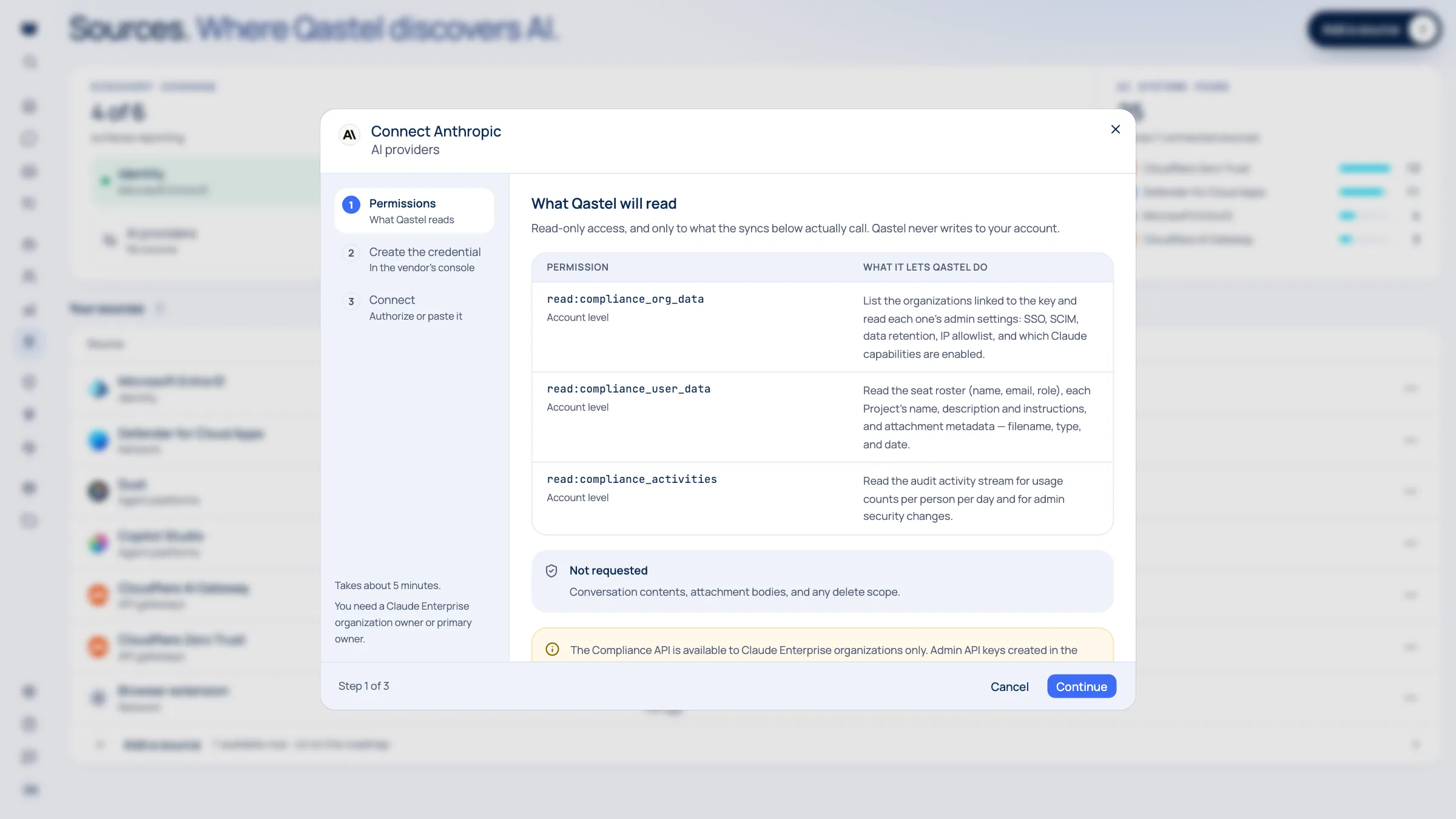
Connects with a Compliance Access Key created in claude.ai, holding three read scopes and no delete scope. Qastel checks every scope before saving, and never reads conversations or the contents of attachments.
What you need before you start
- A Claude Enterprise organisation: the Compliance API is not offered on other plans
- An organisation owner or primary owner, to create the key
In claude.ai, open Organization settings → Compliance API and create a Compliance Access Key with the three read scopes Qastel lists.
In Qastel, open Sources, choose Anthropic, paste the key, then connect.
See what Claude already knows about your AI.
Read-only, in minutes. Nothing is ever written back.